
Quick answer: a fast theme ships little CSS and JavaScript, loads fonts locally, puts the main image in the HTML where the browser finds it early, and reserves space for everything that loads late. Features are not the problem. Loading all of them on every page is.
We built our own theme, Perfectly, for review and content sites, and measured it at each step. These are the decisions that moved the numbers, and how to check any theme against them before you install it.
The numbers we ended up with
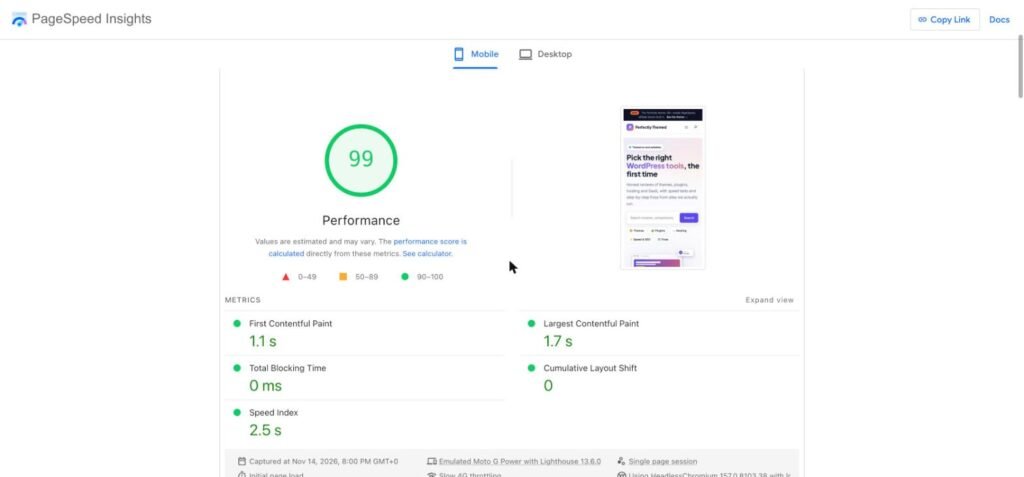
| Lighthouse mobile | Homepage |
|---|---|
| Performance | 99 |
| Accessibility | 100 |
| Best practices | 100 |
| First Contentful Paint | 1.1 s |
| Largest Contentful Paint | 1.7 s |
| Total Blocking Time | 0 ms |
| Cumulative Layout Shift | 0 |
That last line of the caption matters. A theme sets the ceiling. What you add afterwards decides how close you stay to it.
1. Count the CSS, do not trust the feature list
Perfectly’s front-end stylesheet is about 19 KB before compression. Many multipurpose themes send several hundred kilobytes of CSS, most of it for layouts the current page does not use. The browser must download and parse all of it before it paints anything.
Block themes help here because WordPress only prints the styles for blocks that are actually on the page.
2. Treat JavaScript as the expensive part
The theme adds no jQuery and a single deferred script of under 1 KB, which powers the copy button on code blocks. The mobile menu is WordPress’s own navigation block. Everything else, including the table of contents, breadcrumbs, reading time and related posts, is rendered on the server as plain HTML. That is why Total Blocking Time is zero: there is almost nothing for the phone’s processor to chew on.
When you evaluate a theme, open its demo, then DevTools → Network → JS. A blog page that needs more than a handful of scripts before anyone has clicked anything will struggle on mid-range phones.
3. Host fonts locally and limit them to two
We use two variable fonts, Inter for text and Plus Jakarta Sans for headings, served from the theme folder and preloaded. A variable font covers every weight in one file, so there is no separate download for bold or semibold. Loading from your own domain also avoids an extra connection to a font service.
4. Make the largest image easy to find
The hero image is a normal image tag in the HTML, in WebP, about 30 KB, and it is not lazy loaded. Themes that put the hero in a slider or a CSS background hide it from the browser until late. We measured what that costs on another site of ours: replacing a slider with a static hero took a homepage from 61 to 94.
5. Reserve space for everything that arrives late
Layout shift comes from elements that appear without a reserved size: images without dimensions, ads, embeds, fonts that swap. Post images in the theme’s grids have a fixed aspect ratio, and the ad slot pattern has a reserved minimum height, so the text does not jump when an ad fills in.
6. Build review features as blocks, not plugins
Comparison tables, pros and cons, verdict boxes and FAQ sections are block patterns and styles inside the theme. They are HTML and a few lines of CSS. The alternative on many sites is a page builder plus a table plugin plus a review plugin, each with its own stylesheet and script on every page.
7. Do not fight the cache
No part of the layout depends on per-visitor PHP, so a full-page cache can serve every page as a static file. If you use LiteSpeed, our safe LiteSpeed Cache setup is the one we run.
How to test a theme before you commit
- Run the theme’s demo homepage and a demo article through PageSpeed Insights on mobile. Developers optimise their demos, so a slow demo is a bad sign
- In DevTools → Network, reload with the cache disabled and note the total size of CSS and JS
- Check whether the page requests jQuery, a slider script or a page builder script
- Look at where fonts come from and how many files load
- Install it on a staging site with your own content and test again, because your images and plugins are part of the result
What a fast theme will not fix
- Slow hosting: time to first byte is decided by the server and the cache, not the theme
- Oversized images: a 2 MB photo is slow in any theme
- Third-party scripts: ads, chat widgets and tag managers usually cost more than the theme itself
You can see the theme and its four colour styles on our themes page.
Frequently asked questions
Are block themes faster than classic themes?
They can be, because WordPress loads only the CSS for blocks used on the page and block themes rarely need jQuery. A lean classic theme can still beat a bloated block theme, so measure rather than assume.
Does a theme affect SEO?
Indirectly. A theme controls page speed, heading structure, mobile layout and how clean the HTML is. It does not replace content quality or an SEO plugin for titles, sitemaps and schema.
What PageSpeed score should a theme get?
A clean install should reach 90 or more on mobile. Expect that to drop once ads, analytics and real images are added, which is why a high starting point matters.
Is a lightweight theme enough to pass Core Web Vitals?
No. Core Web Vitals are measured on real visits, so hosting, caching, images and third-party scripts count as much as the theme.

Leave a Reply