
We test products ourselves and may earn a commission when you buy through our links, at no extra cost to you. Read our affiliate disclosure
Quick answer: for a blog, pick hosting on five things: a server with full-page caching (LiteSpeed or NGINX), a data centre near your readers, the renewal price rather than the first-year price, automatic backups you can restore yourself, and support you have tested before you need it.
Most “best hosting” lists rank companies by commission. This guide does the opposite: it gives you the criteria and the tests, so you can judge any host yourself, including the one you are already paying for.
1. Server software and caching
A blog is mostly the same pages served to everyone, which makes it ideal for full-page caching. The web server decides how well that works:
- LiteSpeed with the free LiteSpeed Cache plugin caches pages at server level
- NGINX with FastCGI cache does the same job, usually configured by the host
- Plain Apache relies on a PHP cache plugin, which is slower because PHP still starts for each request
Ask the host which one your plan uses. It is rarely on the pricing page, and it matters more than the number of CPU cores.
2. Server location
Every request travels to the data centre and back. If your readers are in the United States and your server is in Europe, each visit starts with a delay no plugin can remove. Choose the location nearest to most of your audience when you sign up, because moving later is harder. A CDN helps with images and static files, but uncached HTML still comes from the origin.
3. The renewal price
Shared hosting is sold with a large first-term discount. Before you buy, find the renewal price in the cart or the terms and compare hosts on that figure. Also check how long you must commit to get the advertised rate, since it is often 36 or 48 months paid upfront.
4. Backups and staging
- Daily automatic backups, kept for at least a week
- A restore button you can use yourself, without opening a ticket
- A staging copy for testing updates before they touch the live site
Check whether backups are included in your plan or sold as an add-on. On entry-level plans they are often weekly, not daily.
5. Limits that are not on the sales page
“Unlimited” plans still have limits. The ones that affect a growing blog are the inode limit (the number of files, which thumbnails use up quickly), PHP workers or entry processes (how many visitors can be served at the same moment), and the PHP memory limit. They are listed in the plan’s technical details or acceptable use policy.
6. Support
Send a pre-sales question through live chat at an awkward hour and see how long a useful answer takes. That is the support you will get when the site is down.
What we run and what we measured
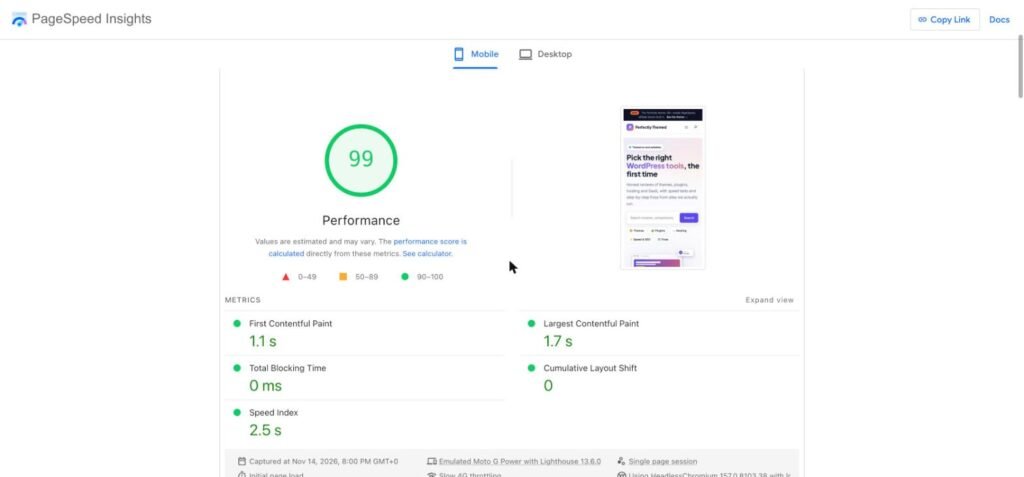
This site is hosted on Hostinger shared hosting, which uses LiteSpeed. On 14 November 2026 its homepage scored 99 for mobile performance in PageSpeed Insights, with a 1.1 second First Contentful Paint and a 1.7 second Largest Contentful Paint, running our own theme and LiteSpeed Cache.
That is one site on one day, with a light theme and no ads, so read it as “shared LiteSpeed hosting is not the bottleneck for a new blog” rather than as a ranking of hosts. We will add side-by-side results here as we test other hosts on our own sites.
How to test a host yourself
- Buy the shortest term with a money-back guarantee and note the refund deadline
- Install WordPress with a default theme and no plugins
- In Chrome DevTools → Network, reload the homepage and read “Waiting for server response” on the first request. That is your time to first byte, before any cache
- Enable the host’s recommended cache and repeat. The difference shows what caching is doing
- Add a free uptime monitor that checks every five minutes and leave it running for the whole refund period
- Ask support one real technical question
Shared, managed or VPS?
| Type | Good for | Trade-off |
|---|---|---|
| Shared | New blogs and small sites | Resources shared with other accounts, so limits are lower |
| Managed WordPress | Sites that earn money and need hands-off updates and backups | Higher price, often billed by visits |
| VPS or cloud | High traffic, or people who are comfortable managing a server | You, or a control panel, handle security and updates |
Start on shared hosting with good caching. Move when you have evidence, such as slow response times at peak hours or resource limit warnings from your host, not because a plan sounds more professional.
Frequently asked questions
How much should blog hosting cost?
A new blog runs comfortably on an entry-level shared plan. What matters is the renewal price after the first term, which is typically several times the introductory rate.
Do I need managed WordPress hosting for a blog?
Not at the start. Managed hosting adds convenience such as automatic updates, staging and expert support. A well-cached shared plan is fast enough for a new site.
Is shared hosting fast enough for Core Web Vitals?
It can be. With full-page caching and a light theme, the server is rarely the limit on a low-traffic site. Images, fonts and third-party scripts usually matter more.
Can I move my blog to another host later?
Yes. Most hosts offer free migration, and migration plugins copy the files and database in one step. Keep your domain registered separately so switching hosts only means changing DNS.

Leave a Reply